
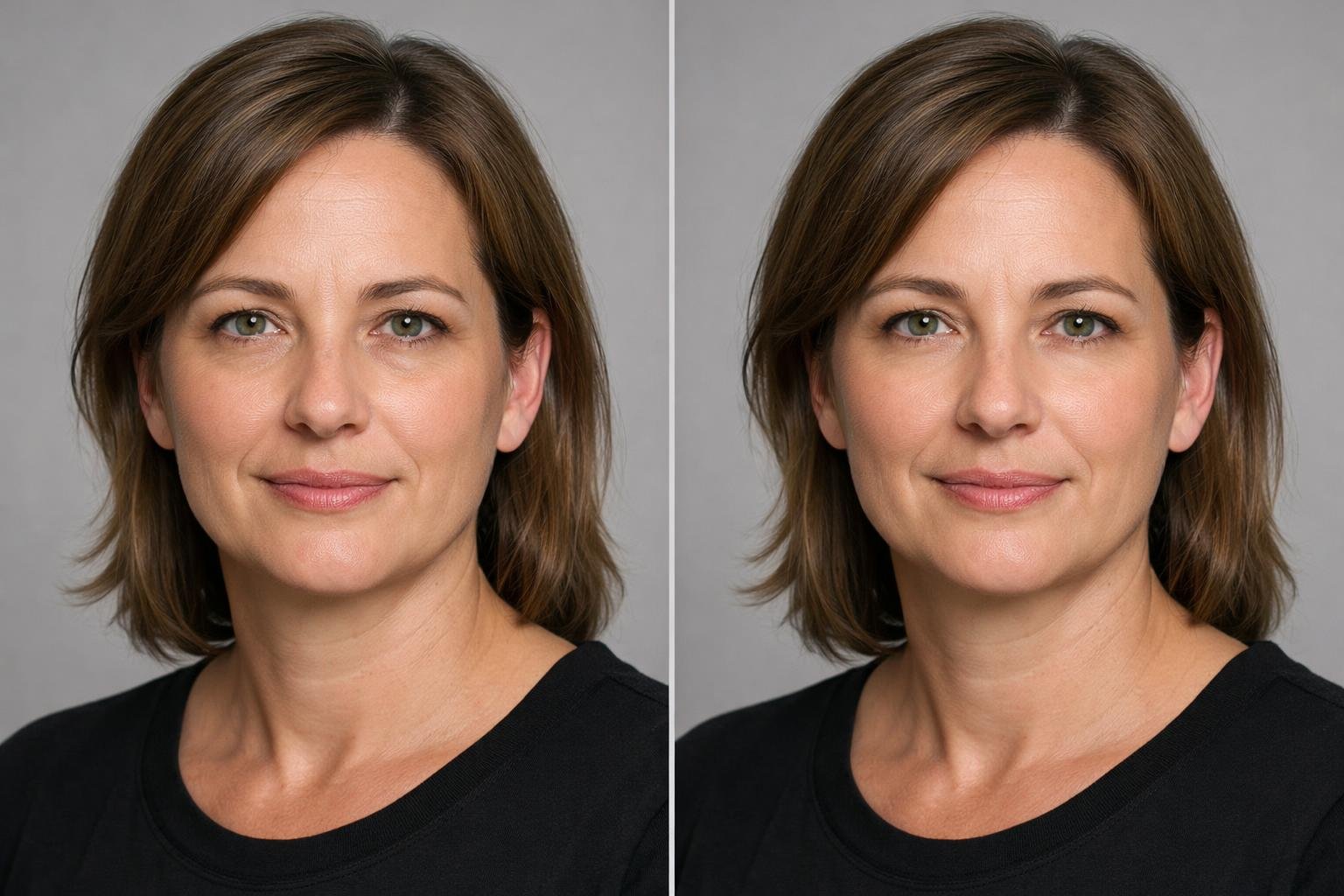
Copy and paste prompt
Upload a clear, front-facing portrait with the prompt.
Upload a clear portrait and paste the prompt below to preview a subtle lower-eyelid refinement. It directs ChatGPT to use your image as the source of truth, make only relevant changes beneath the eyes, and retain the details that keep the portrait looking natural and recognizable.
How to use this prompt
- Upload a clear, well-lit portrait in which the lower-eye area is visible and not hidden by sunglasses, hair, or deep shadow.
- Paste the main prompt into ChatGPT and submit it with the uploaded portrait.
- Review the result at full size, paying attention to identity, eye shape, skin texture, and lighting consistency.
- If the change is too strong or too subtle, use one of the variants below or ask for a smaller adjustment without changing any other facial features.
Practical tips
- Use the original-resolution portrait when possible so fine skin texture can be retained.
- A front-facing or slightly angled photo with soft, even lighting usually makes subtle edits easier to assess.
- Ask for less smoothing if the result removes natural lines or makes the skin look airbrushed.
- Compare the edit with the original at the same zoom level to check that eye shape and facial proportions remain unchanged.
- For a consistent result across several photos, edit each image separately and specify the same degree of subtle refinement.
Prompt variants
Ultra-subtle refinement
Use this when you want the lightest possible change or need to correct an earlier edit that looks too smooth.
Edit the uploaded portrait with an extremely subtle lower-eyelid refinement. If visible, slightly soften lower-eye puffiness and improve the transition into the upper cheeks without removing natural lines, texture, shadows, or asymmetry. Preserve the person’s exact identity, eye shape, expression, age-appropriate detail, pose, clothing, camera angle, lighting, color, crop, and background. Make no other changes, and do not invent a concern that is not visible in the original image. Treat the uploaded image as the source of truth. Do not invent concerns, asymmetries, or features that are not visible. Apply the requested change only where it is relevant and proportionate to what is present. For the eye area, only reduce upper-eyelid hooding, lower-eyelid bags, or under-eye fullness when those features are visibly present in the source. Do not add postoperative puffiness, redness, bruising, incisions, stitches, or other recovery effects.Natural polished portrait
Use this for profile photos, portraits, or professional headshots that need a subtle, camera-ready finish.
Using the uploaded portrait as the source of truth, create a polished but realistic lower-eye appearance. Gently reduce visible puffiness or pronounced under-eye contouring only where present, while preserving pores, fine lines, natural asymmetry, and the original eye shape. Keep the person fully recognizable and retain the same expression, makeup, hairstyle, pose, clothing, background, framing, lighting, and color. Avoid retouching any other part of the face. Treat the uploaded image as the source of truth. Do not invent concerns, asymmetries, or features that are not visible. Apply the requested change only where it is relevant and proportionate to what is present. For the eye area, only reduce upper-eyelid hooding, lower-eyelid bags, or under-eye fullness when those features are visibly present in the source. Do not add postoperative puffiness, redness, bruising, incisions, stitches, or other recovery effects.Texture-preserving refinement
Use this when maintaining realistic skin detail is the highest priority, especially in close-up portraits.
Edit only the lower-eyelid area in the uploaded image. Create a modestly smoother lower-lid-to-cheek transition where the existing portrait supports it, but retain realistic skin texture, fine creases, tonal variation, and natural shadows. Do not brighten the entire under-eye area or reshape the eyes. Preserve identity and leave all other facial features, hair, makeup, expression, pose, clothing, lighting, lens perspective, crop, and background unchanged. Treat the uploaded image as the source of truth. Do not invent concerns, asymmetries, or features that are not visible. Apply the requested change only where it is relevant and proportionate to what is present. For the eye area, only reduce upper-eyelid hooding, lower-eyelid bags, or under-eye fullness when those features are visibly present in the source. Do not add postoperative puffiness, redness, bruising, incisions, stitches, or other recovery effects.Frequently asked questions
Does this prompt change the shape of the eyes?
It specifically instructs ChatGPT to preserve the original eye shape and focus only on a subtle lower-eyelid-to-cheek refinement.
Can I use this on a photo with makeup?
Yes. The prompt tells the editor to preserve existing makeup. For the most consistent result, use an image with even lighting and clearly visible lower eyelids.
What should I do if the result looks airbrushed?
Try the Ultra-subtle refinement or Texture-preserving refinement variant, and add: “Restore more pores, fine lines, tonal variation, and natural under-eye shadows. ”
Will it remove every under-eye line or shadow?
It is designed to retain realistic, age-appropriate detail rather than erase every line or shadow. The intended result is subtle and natural.
Can this replace a consultation with a qualified professional?
No. An edited portrait is only a visual preview and cannot predict an individual outcome or account for clinical factors.